これは、なにをしたくて書いたもの?
Sonatype Nexus Repository 3ではDocker Registryを使うことができますが、以前はDocker Registryを作成する度にポートを
追加することになっていました。
3.83.0からはPath-Based Routingというものがデフォルトになっており、パスでのルーティングが可能になったようなので
1度試してみたいと思います。
Docker Registryとルーティング
Sonatype Nexus Repository 3でのDocker Registryに関するドキュメントはこちらです。
見るべきはこちらですね。
Docker Registry / Understanding the Path to a Docker Repository
こちらに例が書かれていますが、通常docker pullを行う時には以下のように書きます。
$ docker image pull alpine:latest

## または
$ docker image pull registry-1.docker.io/library/alpine:latest
一方で、Sonatype Nexus Repository 3ではhttps://nexus.example/repository/docker-public/library/alpine:latestのような
URLでアクセスすることになります。つまり、URLパスにSonatype Nexus Repository 3の構造が露出します。
そしてDockerクライアントはイメージのパスに関して要件があり、リポジトリーのパスをDocker Registryのへのパスの
一部を含めることを許可していません。
Docker clients have strict requirements for images paths and do not allow a repository path to be included as part of the path to a docker registry.
この回避方法としてSonatype Nexus Repository 3は以下の4つの方法を挙げています。
- Docker Registry / Path-Based Routing
- パスベースのルーティングを可能にするリポジトリー設定を行う
- イメージ名にはリポジトリー名が含まれることになる
- Sonatype Nexus Repository 3.83.0以降で利用可能
- Docker Subdomain Connector
- Docker Registryに対するサブドメインを作成し、サブドメインごとにルーティングする
- 商用版の機能
- Docker Reverse Proxy Strategies
- Sonatype Nexus Repository 3の前段にリバースプロキシーを配置して、リクエストをSonatype Nexus Repository 3側のパスにマッピングする
- Docker Registry / Port Connectors
- Docker Registryごとにポートを割り当て、クライアントはそのポートを使用する
- リソース消費が大きいため、Port Connectorの数は20個までにすることとされている
- 従来のDocker Registryの構築方法
今回はPath-Based Routingを試してみます。
環境
Sonatype Nexus Repository 3は3.90.1を使い、192.168.121.10で動作しているものとします。
また動作確認にはDockerと
$ docker version
Client: Docker Engine - Community
 Version:           29.3.0
 API version:       1.54
 Go version:        go1.25.7
 Git commit:        5927d80
 Built:             Thu Mar  5 14:25:48 2026
 OS/Arch:           linux/amd64
 Context:           default

Server: Docker Engine - Community
 Engine:
  Version:          29.3.0
  API version:      1.54 (minimum version 1.40)
  Go version:       go1.25.7
  Git commit:       83bca51
  Built:            Thu Mar  5 14:25:48 2026
  OS/Arch:          linux/amd64
  Experimental:     false
 containerd:
  Version:          v2.2.2
  GitCommit:        301b2dac98f15c27117da5c8af12118a041a31d9
 runc:
  Version:          1.3.4
  GitCommit:        v1.3.4-0-gd6d73eb8
 docker-init:
  Version:          0.19.0
  GitCommit:        de40ad0
環境構築はTerraformで行います。
$ terraform version
Terraform v1.14.7
on linux_amd64
Path-Based Routingの設定を見る
最初に、Path-Based Routingで設定するとしてどういうものになるかWeb UIで見てみましょう。
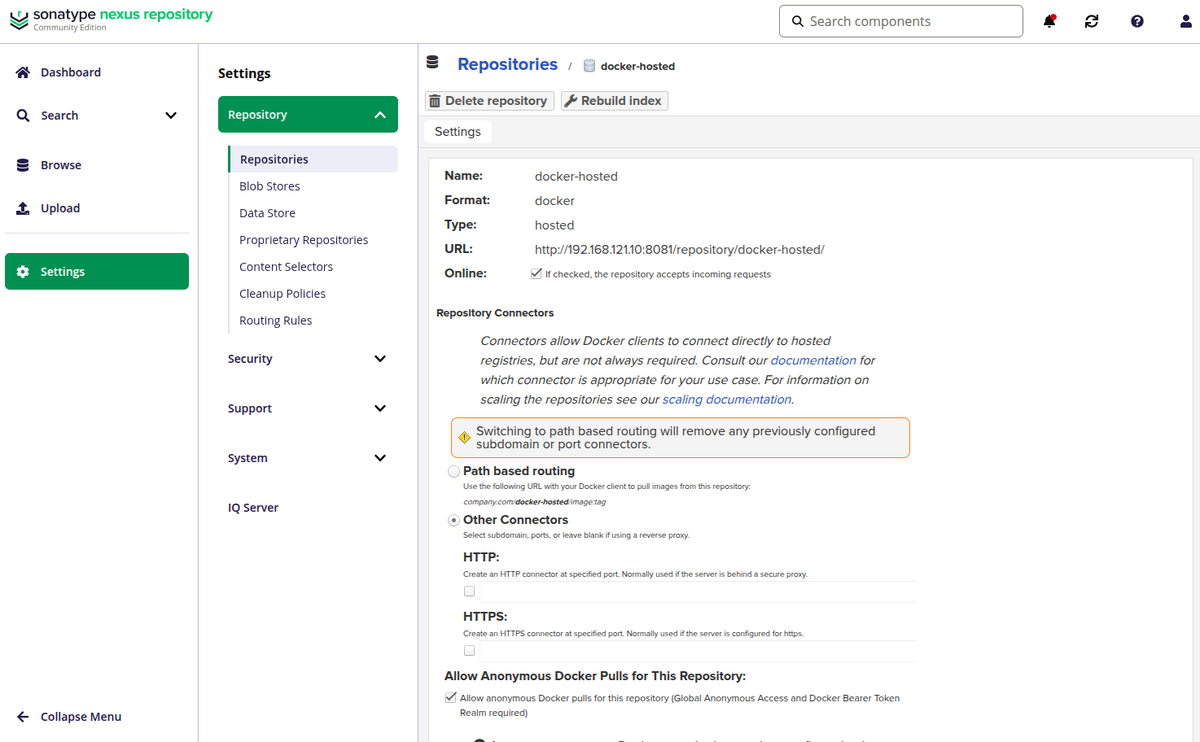
以下はDocker Hosted Registryを作成する時のスクリーンショットです。「Repository Connectors」で作成したDocker Registryへの
接続方法を選ぶのですが、「Path-Based Routing」の場合は選択するだけです。

リポジトリー名がそのままURLに入ると書かれていますね。
Use the following URL with your Docker client to pull images from this repository:
company.com/repo-name/image:tag
Port Connectorsを使う場合は、使用するプロトコルに合わせてHTTPまたはHTTPSポートを選ぶ必要があります。そして、
Docker Registryを追加する度に使用するポートは増えていきます。
後者をなんとかしたいというのがPath-Based Routingができた背景なのかな、と思います。
Docker RegistryをTerraformで作成する
では、Docker Registryを作成します。Terraformを使います。
ただ、現在のNexus ProviderではPath-Based Routingに対応していないようなので、そこは構築後に手動で変更することにします。
Terraformの構成ファイル。
main.tf
terraform {
  required_version = "1.14.7"

  required_providers {
    nexus = {
      source  = "datadrivers/nexus"
      version = "2.7.1"
    }
  }
}

provider "nexus" {
  username = "admin"
  password = "password"
  url      = "http://192.168.121.10:8081"
  insecure = true
}

resource "nexus_security_realms" "this" {
  active = [
    "NexusAuthenticatingRealm",
    "DockerToken",
  ]
}

resource "nexus_repository_docker_hosted" "this" {
  name   = "docker-hosted"
  online = true

  docker {
    force_basic_auth = false
    v1_enabled       = false
    ## http_portやhttps_portは不要
  }

  storage {
    blob_store_name                = "default"
    strict_content_type_validation = true
    write_policy                   = "ALLOW_ONCE" ## 再デプロイ不可
    latest_policy                  = true         ## latestタグのみ再デプロイ可
  }
}

resource "nexus_repository_docker_proxy" "dockerhub" {
  name   = "docker-dockerhub-proxy"
  online = true

  docker {
    force_basic_auth = false
    v1_enabled       = false
    ## http_portやhttps_portは不要
  }

  docker_proxy {
    index_type = "HUB"
  }

  storage {
    blob_store_name                = "default"
    strict_content_type_validation = true
  }

  proxy {
    remote_url       = "https://registry-1.docker.io"
    content_max_age  = 1440
    metadata_max_age = 1440
  }

  negative_cache {
    enabled = true
    ttl     = 1440
  }

  http_client {
    blocked    = false
    auto_block = true
  }
}

resource "nexus_repository_docker_group" "this" {
  name   = "docker-group"
  online = true

  docker {
    force_basic_auth = false
    v1_enabled       = false
    ## http_portやhttps_portは不要
  }

  group {
    member_names = [
      nexus_repository_docker_hosted.this.name,
      nexus_repository_docker_proxy.dockerhub.name,
    ]
  }

  storage {
    blob_store_name                = "default"
    strict_content_type_validation = true
  }
}
Hosted Registry(docker-hosted)、Proxy Registry(docker-dockerhub-proxy)、これらをまとめた
Group Registry(docker-group)を作成します。
適用。
$ terraform init
$ terraform apply
構築されたDocker Registryを見ると、「Repository Connectors」がすべて「Other Connectors」になっています。
これを「Path based routing」を選択するようにして「Save」します。
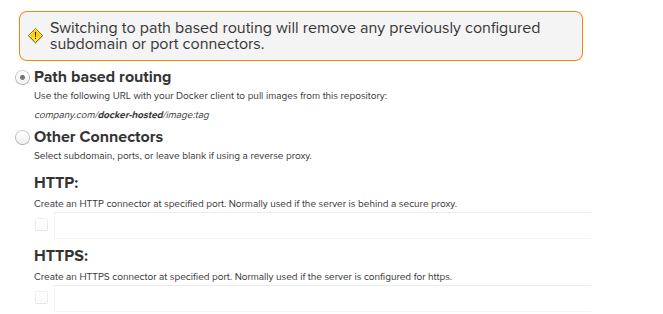
全Docker Registryに対して設定したら、準備完了です。
使ってみる
それでは使ってみましょう。
作成したDocker Registryは以下の3つでした。
- docker-hosted
- docker-dockerhub-proxy
- Docker Hubへのプロキシー
- docker-group
Docker Daemonにinsecure-registriesを設定。
/etc/docker/daemon.json
{
  "insecure-registries": [
    "192.168.121.10:8081"
  ]
}
再起動。
$ sudo systemctl restart docker
Proxy Registryから使ってみましょう。
イメージはどうやって指定すればよいのでしょうか?Dockerクライアントはパスに関する要件があるということでした。
リポジトリーのページにあるURLをそのまま使ってアクセスすると、失敗しました。
$ docker image pull 192.168.121.10:8081/repository/docker-dockerhub-proxy/nginx:1.29.6-trixie
Error response from daemon: failed to resolve reference "192.168.121.10:8081/repository/docker-dockerhub-proxy/nginx:1.29.6-trixie": 192.168.121.10:8081/repository/docker-dockerhub-proxy/nginx:1.29.6-trixie: not found
この指定ではないようです。
よくよく見ると、こちらにやり方が書いていました。
Docker Registry / Accessing Repositories
こういう形式になるようです。namespaceの箇所をリポジトリー名にすればよさそうですね。
$ docker <command> <nexus-hostname>:<https-repository-port>/<namespace>/<image>:<tag>
$ docker search <nexus-hostname>:<https-repository-port>/<search-term>
確認。
$ docker image pull 192.168.121.10:8081/docker-dockerhub-proxy/nginx:1.29.6-trixie
1.29.6-trixie: Pulling from docker-dockerhub-proxy/nginx
9baba07a35b6: Pull complete
4174e33a2c9e: Pull complete
ec781dee3f47: Pull complete
6b40784e4837: Pull complete
980067d12da2: Pull complete
f0b77348d9b0: Pull complete
0289d65812c3: Pull complete
c96ca1f4ddf7: Download complete
00238b7dc6b2: Download complete
Digest: sha256:dec7a90bd0973b076832dc56933fe876bc014929e14b4ec49923951405370112
Status: Downloaded newer image for 192.168.121.10:8081/docker-dockerhub-proxy/nginx:1.29.6-trixie
192.168.121.10:8081/docker-dockerhub-proxy/nginx:1.29.6-trixie
OKでした。
1度削除。
$ docker image rm 192.168.121.10:8081/docker-dockerhub-proxy/nginx:1.29.6-trixie
Untagged: 192.168.121.10:8081/docker-dockerhub-proxy/nginx:1.29.6-trixie
Deleted: sha256:dec7a90bd0973b076832dc56933fe876bc014929e14b4ec49923951405370112
Docker Group Registryもpullしてみます。
$ docker image pull 192.168.121.10:8081/docker-group/nginx:1.29.6-trixie
1.29.6-trixie: Pulling from docker-group/nginx
4174e33a2c9e: Pull complete
0289d65812c3: Pull complete
9baba07a35b6: Pull complete
ec781dee3f47: Pull complete
980067d12da2: Pull complete
6b40784e4837: Pull complete
f0b77348d9b0: Pull complete
00238b7dc6b2: Download complete
c96ca1f4ddf7: Download complete
Digest: sha256:dec7a90bd0973b076832dc56933fe876bc014929e14b4ec49923951405370112
Status: Downloaded newer image for 192.168.121.10:8081/docker-group/nginx:1.29.6-trixie
192.168.121.10:8081/docker-group/nginx:1.29.6-trixie
OKです。
あとはHosted Registryですね。
こんなDockerfileを作成。
Dockerfile
FROM ubuntu:24.04

CMD ["echo", "Hello World"]
Dockerイメージをビルド。
$ docker image build -t 192.168.121.10:8081/docker-hosted/hello-world:latest .
確認。
$ docker container run -it --rm 192.168.121.10:8081/docker-hosted/hello-world:latest
Hello World
Sonatype Nexus Repository 3にログインして
$ docker login 192.168.121.10:8081
Username: admin
Password:

WARNING! Your credentials are stored unencrypted in '$HOME/.docker/config.json'.
Configure a credential helper to remove this warning. See
https://docs.docker.com/go/credential-store/

Login Succeeded
push。
$ docker image push 192.168.121.10:8081/docker-hosted/hello-world:latest
The push refers to repository [192.168.121.10:8081/docker-hosted/hello-world]
817807f3c64e: Pushed
e774f9d8c2ac: Pushed
latest: digest: sha256:3d509ffca02b4158da260859f147cb9038a7ae4b603b894f79ce40ab7fe5e943 size: 855
OKです。
ローカルからは削除して
$ docker image rm 192.168.121.10:8081/docker-hosted/hello-world:latest
Untagged: 192.168.121.10:8081/docker-hosted/hello-world:latest
Deleted: sha256:3d509ffca02b4158da260859f147cb9038a7ae4b603b894f79ce40ab7fe5e943
pullと同時に実行。
$ docker container run -it --rm 192.168.121.10:8081/docker-hosted/hello-world:latest
Unable to find image '192.168.121.10:8081/docker-hosted/hello-world:latest' locally
latest: Pulling from docker-hosted/hello-world
e774f9d8c2ac: Download complete
Digest: sha256:3d509ffca02b4158da260859f147cb9038a7ae4b603b894f79ce40ab7fe5e943
Status: Downloaded newer image for 192.168.121.10:8081/docker-hosted/hello-world:latest
Hello World
Group Registryに対しても行ってみます。
$ docker container run -it --rm 192.168.121.10:8081/docker-group/hello-world:latest
Unable to find image '192.168.121.10:8081/docker-group/hello-world:latest' locally
latest: Pulling from docker-group/hello-world
Digest: sha256:3d509ffca02b4158da260859f147cb9038a7ae4b603b894f79ce40ab7fe5e943
Status: Downloaded newer image for 192.168.121.10:8081/docker-group/hello-world:latest
Hello World
こちらもOKですね。
使い方はわかったと思います。
おわりに
Sonatype Nexus Repository 3でDocker Registryを構築する際に、Path-Based Routingを使ってみました。
存在は前々から知っていたのですがなかなか試せていなかったので、この機会にちゃんと確認できてよかったです。
Dockerクライアントから使う時のイメージの指定方法にはちょっと注意ですね。
あとNexus Provider側のPull Requestが取り込まれるのを待つとしましょう。
