これは、なにをしたくて書いたもの?
LiteLLM Proxy(LLM Gateway)で管理UIを使おうとすると、データベース接続が必要になるようです。
これをLiteLLM Proxy 1.83.4+uvで行おうとするとかなり苦労したので、メモしておきます。
LiteLLM Proxyの管理UIを使う
LiteLLM Proxyの管理UIに関するページはこちら。
このページを見ると、データベース接続が要求されています。
Requires db connected
実際に使ってみると、ログインする時にデータベースに接続できる必要があるようです。
それを無視してログインしようとすると、こんなエラーを見ることになります。
{
  "error": {
    "message": "Authentication Error, Not connected to DB!",
    "type": "auth_error",
    "param": "None",
    "code": "400"
  }
}
LiteLLM Proxyのドキュメント内にデータベースに関する記述はあまりないのですが、管理UIのページ内に「setup」と書かれたリンクが
あるのでこちらを見てみるとセットアップ方法が書かれています。
必要なものはこちらです。
- PostgreSQLまたは互換データベース(たとえばSupabase、Neonなど)
- 環境変数
DATABASE_URLまたはLiteLLM Proxyの設定ファイルのgeneral_settings:database_urlにデータベース接続先を設定すること - LiteLLM Proxyの設定ファイルに
general_settings:master_keyを設定していること
これくらいなのですが、実際にやってみたら見事にハマったのでメモです。
環境
今回の環境はこちら。
$ python3 --version
Python 3.12.3


$ uv --version
uv 0.11.7 (x86_64-unknown-linux-gnu)
PostgreSQLはDockerで用意します。
$ docker version
Client: Docker Engine - Community
 Version:           29.4.0
 API version:       1.54
 Go version:        go1.26.1
 Git commit:        9d7ad9f
 Built:             Tue Apr  7 08:36:07 2026
 OS/Arch:           linux/amd64
 Context:           default

Server: Docker Engine - Community
 Engine:
  Version:          29.4.0
  API version:      1.54 (minimum version 1.40)
  Go version:       go1.26.1
  Git commit:       daa0cb7
  Built:            Tue Apr  7 08:36:07 2026
  OS/Arch:          linux/amd64
  Experimental:     false
 containerd:
  Version:          v2.2.3
  GitCommit:        77c84241c7cbdd9b4eca2591793e3d4f4317c590
 runc:
  Version:          1.3.5
  GitCommit:        v1.3.5-0-g488fc13e
 docker-init:
  Version:          0.19.0
  GitCommit:        de40ad0
準備
ひとまずPostgreSQLが必要です。このあたりを参考にして用意します。
Getting Started Tutorial | liteLLM
https://github.com/BerriAI/litellm/blob/v1.83.3.rc.1/docker-compose.yml#L33-L49
起動。
$ docker container run -it --rm --name postgres \
  -p 5432:5432 \
  -e POSTGRES_DB=litellm \
  -e POSTGRES_USER=llmproxy \
  -e POSTGRES_PASSWORD=dbpassword9090 \
  postgres:18.3-bookworm
PostgreSQLに関しては、あまり深く考える必要はありません。
LiteLLM Proxyをインストール。
$ uv add 'litellm[proxy]'
バージョン。
$ uv run litellm --version

LiteLLM: Current Version = 1.83.4
設定ファイル。
config.yaml
model_list:
  - model_name: claude-haiku-4.5
    litellm_params:
      model: github_copilot/claude-haiku-4.5
      drop_params: True
  - model_name: gpt-5-mini
    litellm_params:
      model: github_copilot/gpt-5-mini
      drop_params: True
  - model_name: gpt-4.1
    litellm_params:
      model: github_copilot/gpt-4.1
      drop_params: True
  - model_name: gpt-4o
    litellm_params:
      model: github_copilot/gpt-4o
      drop_params: True

general_settings:
  master_key: sk-1234
  database_url: "postgresql://llmproxy:dbpassword9090@localhost:5432/litellm"
ポイントはgeneral_settings:database_urlですね。データベース接続先は今回は設定ファイルに書くことにしました。
これでひとまず準備は完了です。
LiteLLM Proxyでデータベースに接続してみる
では、ここまでに用意した環境を使ってLiteLLM Proxyを起動してみます。
$ uv run litellm --config config.yaml
すると、盛大にトレースバックを出力して起動に失敗します。
23:32:23 - LiteLLM Proxy:ERROR: utils.py:2374 - Failed to import Prisma client: cannot import name 'Prisma' from 'prisma' (unknown location)
23:32:23 - LiteLLM Proxy:ERROR: utils.py:2375 - This usually means 'prisma generate' hasn't been run yet.
23:32:23 - LiteLLM Proxy:ERROR: utils.py:2378 - Please run 'prisma generate' to generate the Prisma client.
ERROR:    Traceback (most recent call last):
  File /path/to/.venv/lib/python3.12/site-packages/litellm/proxy/utils.py, line 2372, in __init__
    from prisma import Prisma  # type: ignore
    ^^^^^^^^^^^^^^^^^^^^^^^^^
ImportError: cannot import name 'Prisma' from 'prisma' (unknown location)

During handling of the above exception, another exception occurred:

Traceback (most recent call last):
  File /path/to/.venv/lib/python3.12/site-packages/litellm/proxy/proxy_server.py, line 6708, in _setup_prisma_client
    raise e
  File /path/to/.venv/lib/python3.12/site-packages/litellm/proxy/proxy_server.py, line 6704, in _setup_prisma_client
    prisma_client = PrismaClient(
                    ^^^^^^^^^^^^^
  File /path/to/.venv/lib/python3.12/site-packages/litellm/proxy/utils.py, line 2381, in __init__
    raise Exception(
Exception: Unable to find Prisma binaries. Please run 'prisma generate' first.

During handling of the above exception, another exception occurred:

Traceback (most recent call last):
  File /path/to/.venv/lib/python3.12/site-packages/starlette/routing.py, line 694, in lifespan
    async with self.lifespan_context(app) as maybe_state:
  File /usr/lib/python3.12/contextlib.py, line 210, in __aenter__
    return await anext(self.gen)
           ^^^^^^^^^^^^^^^^^^^^^

〜省略〜

  File /path/to/.venv/lib/python3.12/site-packages/fastapi/routing.py, line 206, in merged_lifespan
    async with original_context(app) as maybe_original_state:
  File /usr/lib/python3.12/contextlib.py, line 210, in __aenter__
    return await anext(self.gen)
           ^^^^^^^^^^^^^^^^^^^^^
  File /path/to/.venv/lib/python3.12/site-packages/litellm/proxy/proxy_server.py, line 866, in proxy_startup_event
    prisma_client = await ProxyStartupEvent._setup_prisma_client(
                    ^^^^^^^^^^^^^^^^^^^^^^^^^^^^^^^^^^^^^^^^^^^^^
  File /path/to/.venv/lib/python3.12/site-packages/litellm/proxy/proxy_server.py, line 6753, in _setup_prisma_client
    PrismaDBExceptionHandler.handle_db_exception(e)
  File /path/to/.venv/lib/python3.12/site-packages/litellm/proxy/db/exception_handler.py, line 102, in handle_db_exception
    PrismaDBExceptionHandler.is_database_connection_error(e)
  File /path/to/.venv/lib/python3.12/site-packages/litellm/proxy/db/exception_handler.py, line 43, in is_database_connection_error
    if isinstance(e, prisma.errors.PrismaError):
                     ^^^^^^^^^^^^^
AttributeError: module 'prisma' has no attribute 'errors'

ERROR:    Application startup failed. Exiting.
どうもPrismaが使えないようです。
Prismaを追加してみましょう。
$ uv add prisma
追加されました。
$ uv run prisma --version
prisma                : 5.17.0
@prisma/client        : Not found
Computed binaryTarget : debian-openssl-3.0.x
Operating System      : linux
Architecture          : x64
Node.js               : v24.15.0
Query Engine (Binary) : query-engine 393aa359c9ad4a4bb28630fb5613f9c281cde053 (at ../../.cache/prisma-python/binaries/5.17.0/393aa359c9ad4a4bb28630fb5613f9c281cde053/node_modules/@prisma/engines/query-engine-debian-openssl-3.0.x)
Schema Engine         : schema-engine-cli 393aa359c9ad4a4bb28630fb5613f9c281cde053 (at ../../.cache/prisma-python/binaries/5.17.0/393aa359c9ad4a4bb28630fb5613f9c281cde053/node_modules/@prisma/engines/schema-engine-debian-openssl-3.0.x)
Schema Wasm           : @prisma/prisma-schema-wasm 5.17.0-31.393aa359c9ad4a4bb28630fb5613f9c281cde053
Default Engines Hash  : 393aa359c9ad4a4bb28630fb5613f9c281cde053
Studio                : 0.502.0
再度LiteLLM Proxyを起動します。
$ uv run litellm --config config.yaml
今度はPrismaのマイグレーションが動き始め、起動に成功します。
2026-04-18 23:38:27,736 - litellm_proxy_extras - INFO - Running prisma migrate deploy
2026-04-18 23:38:33,439 - litellm_proxy_extras - INFO - prisma migrate deploy stdout: Prisma schema loaded from schema.prisma
Datasource "client": PostgreSQL database "litellm", schema "public" at "localhost:5432"

113 migrations found in prisma/migrations

Applying migration `20250326162113_baseline`
Applying migration `20250326171002_add_daily_user_table`
Applying migration `20250327180120_add_api_requests_to_daily_user_table`
Applying migration `20250329084805_new_cron_job_table`
Applying migration `20250331215456_track_success_and_failed_requests_daily_agg_table`
Applying migration `20250411215431_add_managed_file_table`
Applying migration `20250412081753_team_member_permissions`
Applying migration `20250415151647_add_cache_read_write_tokens_daily_spend_transactions`
Applying migration `20250415191926_add_daily_team_table`
Applying migration `20250416115320_add_tag_table_to_db`
Applying migration `20250416151339_drop_tag_uniqueness_requirement`

〜省略〜
起動したら、ドキュメントに従ってhttp://localhost:4000/uiにアクセスしてみます。

404です…。
今度はhttp://localhost:4000/にアクセスすると、Swagger UIが確認できます。

そこで「Fallback Login」と書かれているリンクをクリックすると、今度はログイン画面が出てきます。ここでは書かれている内容に従い、
adminユーザーとマスターキーでログインします。

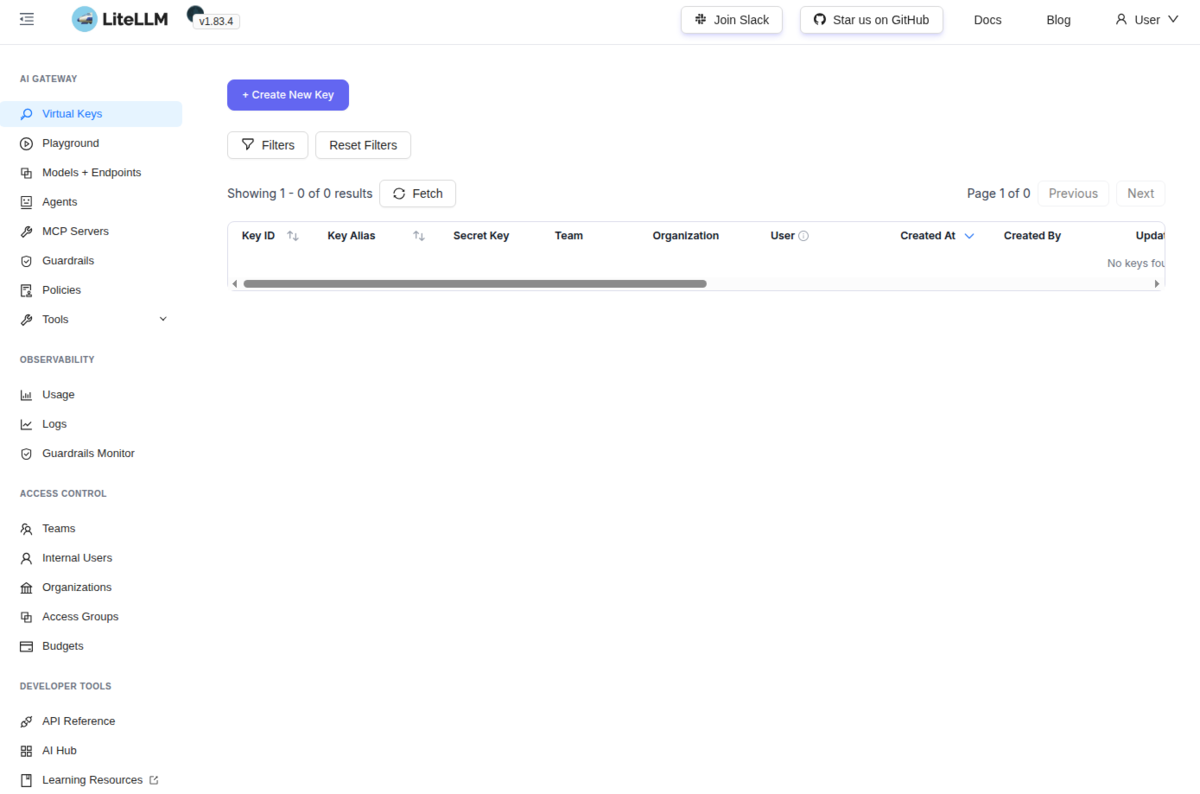
ログインできました。
モデル。
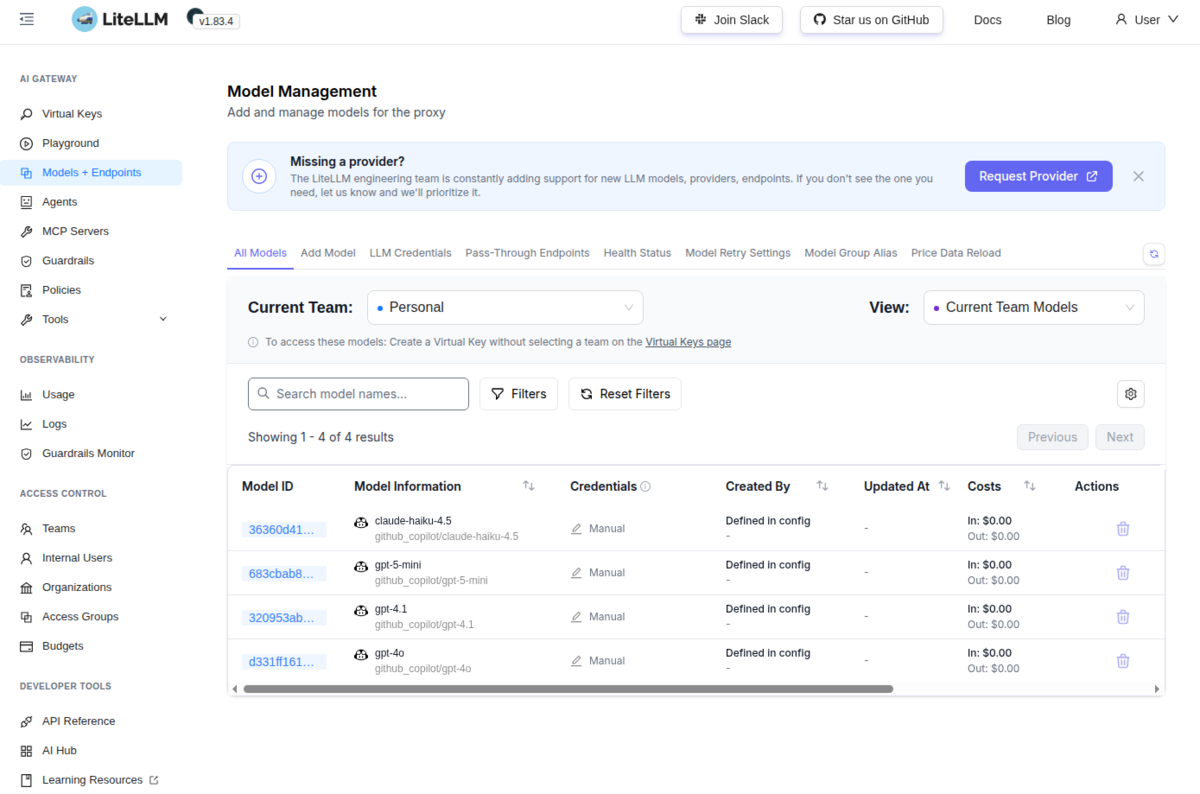
ちなみに、1度ログインするとなぜかhttp://localhost:4000/uiにもアクセスできるようになっています…。
本来は、先に仮想キーを作成しておくのかもしれません。
ひとまずやりたいことはできたので、ここまでにしておきます。
おわりに
LiteLLM Proxy(LLM Gateway) 1.83+uvで管理UIを使うためにデータベースに接続しようとするとうまくいかなかったので、
いろいろ試行錯誤して接続できるようにしてみたという話でした。
uvとの組み合わせが悪いのかバージョンが悪いのかわかりませんが、だいぶてこずりました。
Dockerイメージを使った方がいいんでしょうかね?
